Network-attached storage (NAS) is a semi-PC device that’s designed to carry multiple HDDs with data that can be accessed and interacted with across a network via apps or shared network data. If you’ve ever walked into an office or someone’s home and noticed a tiny PC tower that seemed to have many hard drive disk (HDD) bays loaded within, yep — that’s probably a NAS. Chances are that if you’re here to read about it, you probably have an idea of what a NAS is and why you’d want one, but perhaps you haven’t kept with the times on ideal storage mediums for this purpose. Don’t sweat it; we’re here to provide an easygoing overview of what to look for and why.

Before we dive in, there’s an important distinction that needs to be examined:
The difference between a typical PC HDD and a NAS HDD. While they both use the same technologies — and yes, they’re entirely interchangeable if you so choose — you’re not recommended to simply rip an HDD out of an old PC and plug it into your shiny new NAS. The reason, you see, is none other than HDDs being like CPUs, RAM and any other component of a PC: They vary in quality, stability, speed, cooling, acoustics and more.
We’ll cover all that in a moment; for now, you have a bare-minimum suss of what to expect ahead. Your HDDs are more than the sum of their storage capacities, and yes, that does mean that a more technical application of those capacities will yield more consideration for the other features that are involved in protecting and conveying your data efficiently.
Might be Interesting: Best NAS for Plex Transcoding in 2022
Table of Contents
Factors to Consider When Choosing the Best NAS Hard Drive
Speed (Bandwidth)
The quickness of the input-output operations (I/O) determines the rate at which data can be written and retrieved from an HDD as measured in megabits per second (Mbps) or, with solid state drives (SSDs), gigabits per second (Gbps). Take note that bits and bytes aren’t the same things. Some drives will be listed with measurements in megabytes or gigabytes per second (MBps or GBps). You can compare the two by multiplying the bit rate by eight to find the byte rate, and likewise, dividing the byte rate by eight will give you the bit rate. In other words: One byte is eight bits. Remember this!
The speed of a NAS HDD is a little more important than your average PC HDD thanks to the high-quality content that’s normally streamed from the NAS to receiving devices. Unless you plan to decode only 720p video or JPEG images, you’ll want a drive that can keep the pace without hesitation. Also, remember that your network must be fast enough to support transfers at the rate that the HDD can offload the data; otherwise, you’d be wasting your time spending more on a faster drive.
Power Consumption
This is less important in a NAS HDD simply because the unit can launch into sleep mode when it’s not in use, and while it is being used, a meatier drive that sucks down more power will offset this demand by filling its I/O tasks more quickly. Power consumption is more important to consider when you’re investing in an HDD for a battery-powered unit such as a laptop.
On the other hand, if you’re running a NAS 24/7 and would prefer to keep the power bill down, there are “green” options available. However, HDDs don’t use much power to begin with even with multiple disks running in RAID; a worst-case scenario would be having, say, 4-8 drives running at max I/O for hours on end at roughly 20 watts each. As such, the efficiency metric is often sidelined in favor of more pressing specs when choosing an HDD array for your NAS.
Long-Term Consistency (Thermals, Durability, Transmission Retention)
Ah, a relic of forgotten: the power of an HDD to continuously run for tens or hundreds of hours without breaking a sweat. This is as much a matter of performance as it is durability since an overtaxed HDD can wear down the mechanical components rapidly and result in failure, which spells data loss and lots of frustration.
While not all NAS units require a WD Red drive to satisfy this condition, you’d be smart to seriously consider spending more on such a drive for a unit that’s going to be offloading data for multiple devices on the network at any given moment. Also, remember that HDDs and SSDs generate heat, so having an array loaded into that tiny NAS tower can quickly lead to overheating and performance issues in short order. This is where you need a more durable offering.
Acoustics
Often considered “important but trivial“, this metric defines how much noise the HDD will make while spindling up to tap I/O functions. If you’ve ever attempted to load something on your PC and heard something in the chassis start to wind up, chances are that your HDD might be at work. Well, what you might not know is that PC towers often use cushioning and acoustic trickery to keep fan ambiance and other noises at a minimum — oh, the dreaded coil whine — that a NAS tower often lacks to the same degree.
While choosing a quieter HDD is recommended for this reason, picking the right NAS is also important in this regard. However, if you’re not keeping the NAS where people plan to be sitting, this isn’t as important in the long run.
Capacity
Are you surprised that the storage capacity of a storage drive is important? For most, this is the only metric of an HDD that really matters in their PC, but when you step into hosting a NAS, your drives are about much more than that. However, streaming 1080p and 4K content means you’ll need the space to hold all those high bit-rate video formats, and that means you should have at least 2 TB loaded into your NAS.
Best NAS Hard Drive Brands – Short Introduction
Western Digital Hard Drives for NAS

WD Red
Red drives are a renown offering that takes aim directly at NAS units for the purpose of enduring hot, always-on conditions without mechanical breakdown, data loss or slowdowns over time. These are the marathon runners of WD HDDs and are considered ideal for NAS units everywhere; however, they cost considerably more than your average drive. Additionally, WD Red drives are optimized for RAID setups.
Check Price
WD Gold
 These are the elite workhorses in Western Digital’s lineup, and they’re designed with constant, high-bandwidth usage in mind. Their mean time between failure (MTBF) ratings are the highest among Western Digital’s offerings, meaning they can handle several hundreds of TB in I/O before failing — 550 TB to be exact — placing them at the uppermost tier in terms of data continuity and general transmission reliability over time.
WD Blue
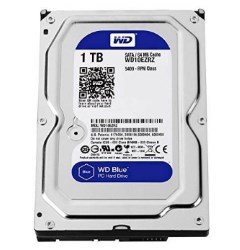 These are the well-rounded storage solutions that come standard with PCs. They’re designed with a little bit of everything in mind: storage capacity, I/O bandwidth, durability, and price. Blues are far more affordable than their Red and Gold brethren thanks to their casual design, but that doesn’t make them a poor option for PCs. However, they may not fare so well in a NAS environment since they’re supposed to take frequent rests as the case would be in a PC.
Seagate Hard Drives for NAS

Seagate IronWolf
 This is Seagate’s response to the WD Red, serving to provide high workload rates (essentially a high MTBF rating) in harsh conditions over time. This means that IronWolf HDDs are meant to handle the heat, wear and tear of a NAS tower that runs around the clock. With AgileArray under the hood, these drives should theoretically scale better with high-end systems while holding their own for years to come.
Seagate IronWolf Pro with Data Recovery
 Take everything that’s great about the IronWolf and throw in alerts for drive reliability errors in addition to data recovery options. Constantly monitored by Seagate’s software, you can rest assured that the drive is in functional order, which prevents spontaneous failures and offers time to create a backup if needed. A data recovery plan is supplied with these drives for two years after purchase, adding that extra layer of security for your peace of mind.
Toshiba
 Toshiba’s lone offering is a straightforward one that does many of the same things as the WD Red and Seagate IronWolf. Supporting up to eight drives in an array at 10 TB each, you have plenty of space in addition to RAID support. As a company, Toshiba is known for their durability in their PCs, laptops and HDD management systems, so longevity and health monitors should be expected in these HDDs much like Seagate’s offering. Additionally, the pricing is often quite good with Toshiba products, but don’t be led to believe that their HDDs are necessarily inferior because of this!
HGST DeskStar NAS
 A brand that you may not have heard of, HGST, has their hands in the NAS HDD market in addition to your favorite brands, and they’re no slouch when it comes to delivering punch for your dollar. HGST is actually the child brand of Western Digital. Their NAS drives bring up to 10 TB storage for 6Gbps SATA interfaces at 7,200 RPM and a vibration sensor to boot, keeping them quiet and quick for long-term usage in your NAS unit. Probably the best part of this setup is the three-year warranty, and while it doesn’t bring all the support that Seagate does in their IronWolf Pro lineup, it matches the WD Red in terms of length.
Best NAS Hard Drive in Category
Best Overall NAS HDD — Western Digital Red
 While neither the fastest nor the most highly rated in terms of MTBF, the WD Red is the first option that comes to mind when you ask just about anyone for an opinion on a NAS drive. The Red wins this debate on a matter of popularity, trustworthiness and fair pricing, but of equal importance is that three-year factory warranty straight out of the box, which is the longest of any drive on our list today and tied with HGST.
The speed isn’t top-notch, but it’s more than sufficient for professional settings, especially at the price and availability points that are extended to users. This, we believe, makes the WD Red the most well-rounded offering for everyday entertainment and professional settings alike.
Check PriceBest-Priced NAS HDD — Western Digital Red
Thanks to the widespread popularity and trustworthiness of the WD Red, the price for this drive is usually lower than its competition, but that’s also partly a matter of where you go to obtain the drive. Still, you can find WD Reds just about anywhere, and their middle-of-the-road specs make for an affordable trip to multi-drive NAS-ville without breaking the bank, unlike WD Golds.
Something else we looked at was, again, the reliability of the drive overall; because the Red is our best overall pick, you’re getting more bang for whatever buck your local retailer is asking of you to pick one up.
We’d like to tack on that getting more speed and drive capacity for your dollar doesn’t necessarily make for a better choice overall. When you consider price, you need to factor all kinds of variables in: heat tolerance, durability, continuity, MTBF, acoustics and more. Even if you find the WD Red running at a higher price point than a competing drive, you still might be saving more money in the long run by sticking with Western Digital’s offering instead.
Check PriceFastest NAS HDD — Western Digital Gold
Western Digital’s Red offering is indeed a swell offering, but what about the other drives, you ask? Objectively, the Gold variety is faster than the Red (249 MBps to the Red’s 112 MBps) while offering far greater MTBF ratings and a few software tricks in addition to hardware tweaks to make them faster and more reliable overall in a server setting.
While not advertised for NAS units, a server room is going to impose similar or more severe demands of a drive than a simple NAS enclosure, which makes the Gold an exceptional pick for your home theater or office presentation NAS. However, the price is a little on the high end for all but professional uses.
If you’re not a fan of Western Digital for whatever reason, you can stick to Seagate’s IronWolf series, which slide in at a relatively close second place with 210 MBps I/O. Seagate packs a number of features on their drives that you don’t find on Western Digital’s counterparts, so if you’re willing to shed around 40 MBps in performance, consider the IronWolf and IronWolf Pro.
Check PriceBest NAS HDD for Support and Warranty – Seagate IronWolf Pro
Although HGST and Western Digital offer the longest warranty periods (three years), Seagate’s two-year protection plan on their IronWolf Pro drives allows for so much more than a simple drive replacement, going as far as to recover your data for you in addition to handing over a new drive.
There are plenty of other reasons to pick up an IronWolf besides this, so if customer service and excellent warranty coverage are down your alley, you may consider the other benefits that come side-loaded with it such as premium transfer rates and specialized HDD health monitoring systems that compare to Toshiba’s own.
Best Quiet NAS HDD – Western Digital Red
We have to give to Western Digital again with the WD Red and Gold, which are the quietest drives to grace your NAS in any setting. The Red is especially good at this since it’s intended just for NAS systems while the Gold can be noisier at times, and some even find that the Gold variant exudes grinding sounds from time to time like one of those old-timey disk drives from way back in the day.
Nonetheless, Seagate’s offerings tend to make considerably more noise on the whole while HGST and Toshiba are somewhere in the middle ground. Once again, there’s a reason so many people prefer the WD Red, and this is just one of those reasons why.
Check Price
Best Hard Drive for NAS FAQ
Might be Interesting: Synology VS QNAP: What is the best NAS
What would happen if a used a typical PC HDD in my NAS instead?
It would still run, but you could quickly run into slowdowns and drive failure in short order — think one or two years, possibly less. With HDDs, there are no guarantees, so in theory, a WD Blue could run just fine for years depending on usage habits, files stored and the temperature of the storage room. However, just know that if you plan to use a PC HDD in your NAS, you’re recommended to go light on the file sizes and usage, meaning that only a handful of people should be using it and only to access small files such as PDFs and JPEGs. Additionally, you’d be wise to not use more than two such drives in an enclosure unless you have a swell cooling system in place or have otherwise placed the NAS in a sub 60-degree environment.
Is it okay to RAID unmatched drives?
This is a point of heavy contention in the tech community. The benefit of matching the drives is their synchronicity; since both drives are the same size and speed, you don’t need to worry about one choking out the other in terms of space or I/O bandwidth. On the other hand, matching two different drives — a WD 2 TB to a Seagate 10 TB for example — is smart from a failure preparation standpoint since the difference in the drives’ makeup will almost guarantee that one fails before the other, allowing you to make the most of a mirroring array and replace the broken drive accordingly while the still-functional one holds everything up.
Should I consider any of the other hardware in my NAS when selecting an HDD?
Truthfully, it doesn’t matter what the hardware specs of your NAS are because NAS HDDs simply are what they are: robust. Even if you’re running a crappy setup with an old Celeron and outdated decoding protocols, the HDD will still endure a degree of constant usage and exposure to temperatures that can harm a typical PC HDD.
Conclusion
We tried to keep it relatively simple here to help you find the best hard drive for NAS that suits your requirements. As stated in the FAQ, the other hardware that’s in your NAS, while important by itself, isn’t exactly relevant when selecting an HDD since a NAS-rated drive will be recommended no matter what you’re running. More than likely, you’ll decide on a drive based on brand affinity, customer support and other factors that have nothing to do with bandwidth bottlenecks in your NAS hardware.
Leave a Reply